DigiTekXplorer
Home
Capstone Project
abCore16 Folder
  • abCore16 Project
  • Instruction Set
  • Our Toolchain
  • abCore16 User Guide
  • FPGA Implementation
Building With AI
UART Design Folder
  • UART Design
RP Pico Folder
  • Raspberry Pi Pico
  • Pico VGA Project
  • Pico Audio Project
Android App Folder
  • Android App Development
  • BLE Basics
  • Android Studio
  • BLE App User Guide
  • The Gemini Prompt
FPGAs
Coding Basics
Embedded Systems
Basic Concepts
abDraw
abVisualRTL
DigiTekXplorer
Home
Capstone Project
abCore16 Folder
  • abCore16 Project
  • Instruction Set
  • Our Toolchain
  • abCore16 User Guide
  • FPGA Implementation
Building With AI
UART Design Folder
  • UART Design
RP Pico Folder
  • Raspberry Pi Pico
  • Pico VGA Project
  • Pico Audio Project
Android App Folder
  • Android App Development
  • BLE Basics
  • Android Studio
  • BLE App User Guide
  • The Gemini Prompt
FPGAs
Coding Basics
Embedded Systems
Basic Concepts
abDraw
abVisualRTL
More
  • Home
  • Capstone Project
  • abCore16 Folder
    • abCore16 Project
    • Instruction Set
    • Our Toolchain
    • abCore16 User Guide
    • FPGA Implementation
  • Building With AI
  • UART Design Folder
    • UART Design
  • RP Pico Folder
    • Raspberry Pi Pico
    • Pico VGA Project
    • Pico Audio Project
  • Android App Folder
    • Android App Development
    • BLE Basics
    • Android Studio
    • BLE App User Guide
    • The Gemini Prompt
  • FPGAs
  • Coding Basics
  • Embedded Systems
  • Basic Concepts
  • abDraw
  • abVisualRTL
  • Home
  • Capstone Project
  • abCore16 Folder
    • abCore16 Project
    • Instruction Set
    • Our Toolchain
    • abCore16 User Guide
    • FPGA Implementation
  • Building With AI
  • UART Design Folder
    • UART Design
  • RP Pico Folder
    • Raspberry Pi Pico
    • Pico VGA Project
    • Pico Audio Project
  • Android App Folder
    • Android App Development
    • BLE Basics
    • Android Studio
    • BLE App User Guide
    • The Gemini Prompt
  • FPGAs
  • Coding Basics
  • Embedded Systems
  • Basic Concepts
  • abDraw
  • abVisualRTL

DigiTekXplorer - abVisualRTL

abVisualRTL FSM Example
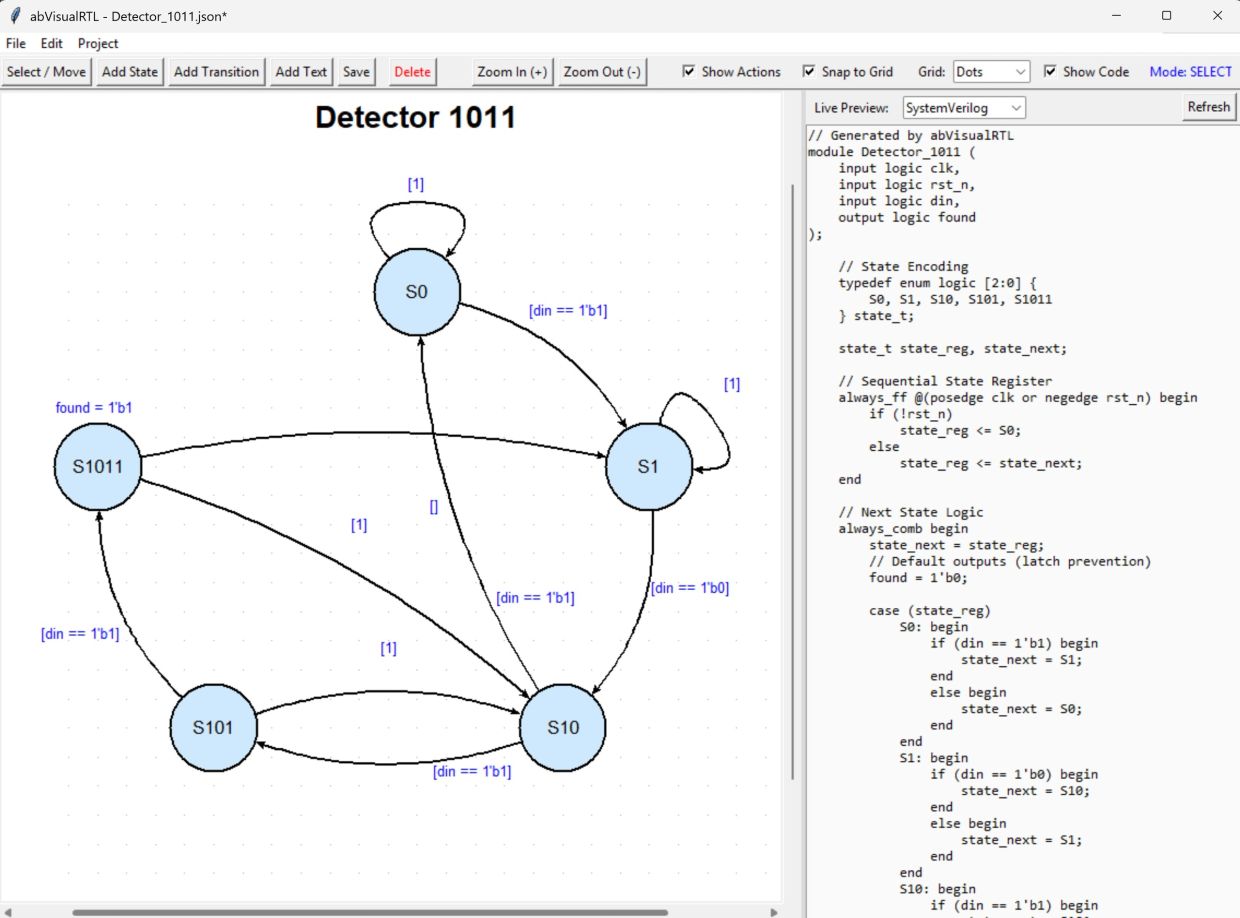
Draw a State Machine, Generate the HDL


abVisualRTL turns state diagrams into hardware. You place states on a zoomable canvas, draw transitions between them, and attach conditions, priorities and Moore or Mealy output actions — then the tool generates synthesizable RTL you can drop straight into a design.


The same diagram emits both SystemVerilog and VHDL. Typed input and output ports, a designated reset state, and automatic state-encoding bit-width all flow from the model into the generated code, with a live preview alongside the canvas so you see the HDL as you draw.


Under the hood it keeps a clean separation of model, UI and generators, a command-pattern undo system where every edit is reversible, and versioned JSON project files — the foundation for repeatable, testable code generation.


Get abVisualRTL Python code and tutorial at: https://github.com/digitekxplorer/abVisualRTL

Key Capabilities

Visual FSM editor

Moore & Mealy outputs

Moore & Mealy outputs

Place states and draw transitions on a zoomable, grid-aligned canvas. Each transition carries a condition and a priority that resolves ordering between competing edges. 

Moore & Mealy outputs

Moore & Mealy outputs

Moore & Mealy outputs

 Attach state-based (Moore) or transition-based (Mealy) output actions, with a per-port default value that anchors combinational outputs cleanly. 

SystemVerilog or VHDL

Moore & Mealy outputs

SystemVerilog or VHDL

One diagram, two targets: generate synthesizable SystemVerilog and VHDL from the identical model, with matching state encoding and reset behavior. 

Typed ports & signals

Reset state & encoding

SystemVerilog or VHDL

Declare input and output ports with widths; state-encoding bit-width is computed automatically so the enum and registers size themselves to the machine. 

Reset state & encoding

Reset state & encoding

Reset state & encoding

Mark the reset state and the generators wire up the reset branch and the state register around it — the machine always powers up where you intend. 

Live HDL preview

Reset state & encoding

Reset state & encoding

 The generated code updates alongside the diagram, so the RTL is visible as you edit states, transitions and actions rather than only on export. 

Command-pattern undo

Versioned project files

Versioned project files

Every edit is a reversible command on a proper undo/redo stack — a consistent history model instead of ad-hoc state snapshots. 

Versioned project files

Versioned project files

Versioned project files

Diagrams round-trip through a versioned JSON format with clean model serialization, keeping the model, UI and generators cleanly separated. 

Copyright © 2026 DigiTekXplorer - All Rights Reserved.


Powered by

This website uses cookies.

We use cookies to analyze website traffic and optimize your website experience. By accepting our use of cookies, your data will be aggregated with all other user data.

Accept