DigiTekXplorer
Home
Capstone Project
abCore16 Folder
  • abCore16 Project
  • Instruction Set
  • Our Toolchain
  • abCore16 User Guide
  • FPGA Implementation
AI Case Studies
UART Design Folder
  • UART Design
RP Pico Folder
  • Raspberry Pi Pico
  • Pico VGA Project
  • Pico Audio Project
Android App Folder
  • Android App Development
  • BLE Basics
  • Android Studio
  • BLE App User Guide
  • The Gemini Prompt
FPGAs
Coding Basics
Embedded Systems
Basic Concepts
abDraw
abVisualRTL
DigiTekXplorer
Home
Capstone Project
abCore16 Folder
  • abCore16 Project
  • Instruction Set
  • Our Toolchain
  • abCore16 User Guide
  • FPGA Implementation
AI Case Studies
UART Design Folder
  • UART Design
RP Pico Folder
  • Raspberry Pi Pico
  • Pico VGA Project
  • Pico Audio Project
Android App Folder
  • Android App Development
  • BLE Basics
  • Android Studio
  • BLE App User Guide
  • The Gemini Prompt
FPGAs
Coding Basics
Embedded Systems
Basic Concepts
abDraw
abVisualRTL
More
  • Home
  • Capstone Project
  • abCore16 Folder
    • abCore16 Project
    • Instruction Set
    • Our Toolchain
    • abCore16 User Guide
    • FPGA Implementation
  • AI Case Studies
  • UART Design Folder
    • UART Design
  • RP Pico Folder
    • Raspberry Pi Pico
    • Pico VGA Project
    • Pico Audio Project
  • Android App Folder
    • Android App Development
    • BLE Basics
    • Android Studio
    • BLE App User Guide
    • The Gemini Prompt
  • FPGAs
  • Coding Basics
  • Embedded Systems
  • Basic Concepts
  • abDraw
  • abVisualRTL
  • Home
  • Capstone Project
  • abCore16 Folder
    • abCore16 Project
    • Instruction Set
    • Our Toolchain
    • abCore16 User Guide
    • FPGA Implementation
  • AI Case Studies
  • UART Design Folder
    • UART Design
  • RP Pico Folder
    • Raspberry Pi Pico
    • Pico VGA Project
    • Pico Audio Project
  • Android App Folder
    • Android App Development
    • BLE Basics
    • Android Studio
    • BLE App User Guide
    • The Gemini Prompt
  • FPGAs
  • Coding Basics
  • Embedded Systems
  • Basic Concepts
  • abDraw
  • abVisualRTL

DigiTekXplorer - abDraw

abCore16 Microprocessor Drawing Example
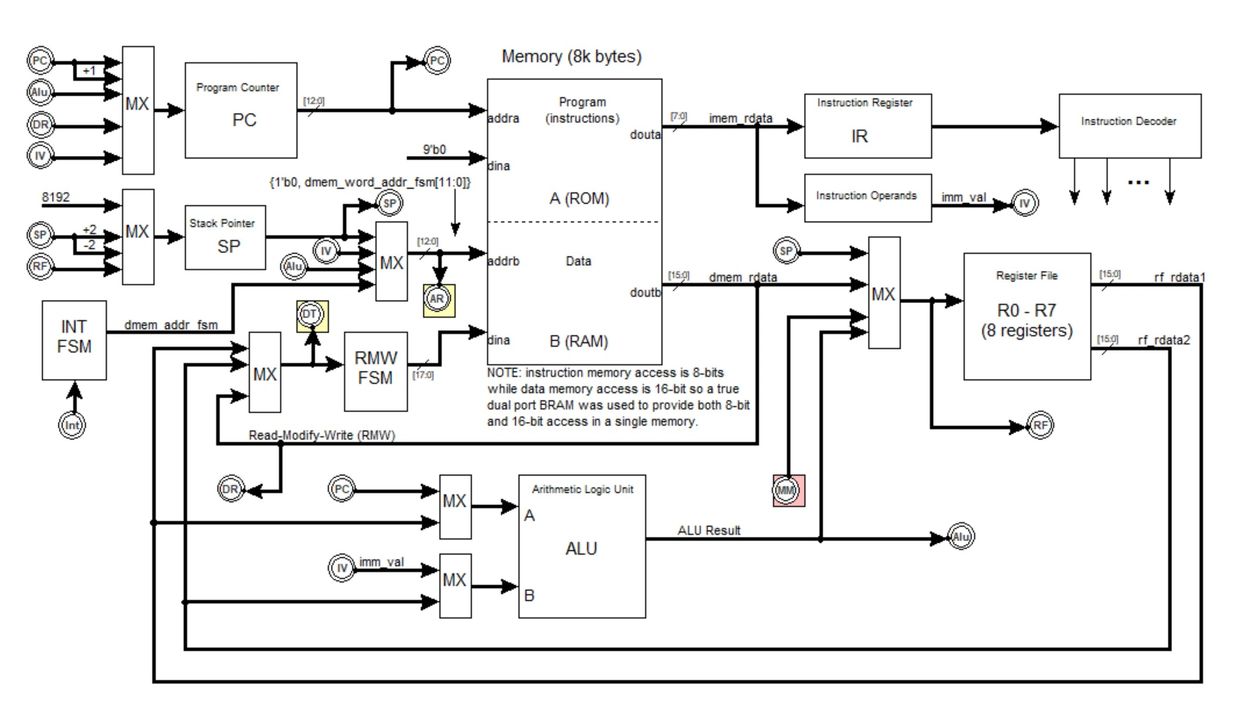
abDraw Schematic Capture

 abDraw is a schematic drawing tool for electronic diagrams. It was built to capture real electrical design schematics — the kind where a 16-bit microprocessor core like abCore16 spreads across multiple sheets of muxes, registers, adders and buses — and to keep every connection intact as the drawing evolves. 


Blocks carry named pins on their edges. Wires bind to a specific pin and stay attached through moves and resizes, rerouted by an orthogonal auto-router that always enters and exits a pin perpendicular to its edge. Buses, bit-slice taps, net labels and off-page connectors let a design span sheets while a single net keeps its identity everywhere it appears.


When the drawing is done, abDraw extracts a netlist, flags unconnected pins, and exports publication-ready PNGs and multi-page PDFs straight from the same canvas geometry.


Get abDraw Python code and tutorial at: https://github.com/digitekxplorer/abDraw

Key Capabilities

Named component pins

Manual routing when you want it

Orthogonal net router

 Ports sit on block edges — ordered, grid-aligned, per side. Wires bind to a specific named pin and stay attached through every move and resize. 

Orthogonal net router

Manual routing when you want it

Orthogonal net router

 Any wire with a pinned end is owned by the router and rebuilt on every move, entering and exiting pins perpendicular to the edge with staggered channels so fans never overlap.

Manual routing when you want it

Manual routing when you want it

Manual routing when you want it

 Drag blue waypoint handles, double-click to insert, slide mid-segments — hand routes are honored as drawn and only released back to the router when a connected block moves. 

Design primitives

Buses, bit-slices & junctions

Manual routing when you want it

Muxes (N inputs, binary-labeled sel), registers with D/Q/clk and a clock triangle, adders, and rotatable off-page connectors — placed as first-class parametric blocks. 

Buses, bit-slices & junctions

Buses, bit-slices & junctions

Buses, bit-slices & junctions

Mark a wire as a bus, tap a bit range like [7:0], and get automatic junction dots wherever three or more ends meet or a T-junction lands on a segment. 

Net labels & off-sheet nets

Buses, bit-slices & junctions

Buses, bit-slices & junctions

Same net name means the same net — highlighted in blue — and off-page connectors carry a node across sheets so a design can span many pages. 

Multi-sheet designs

Multi-sheet designs

Multi-sheet designs

Sheet tabs to add, rename, delete and switch; per-sheet title blocks and page sizes (Letter, Legal, Tabloid, ANSI, A-series or custom) on a scrollable pasteboard. 

Netlist & DRC

Multi-sheet designs

Multi-sheet designs

Union-find netlist extraction across all sheets exports a .net file, and Validate Schematic rings every unconnected pin in red. 

Groups & annotation

Multi-sheet designs

Publication-ready export

Marquee-select and move groups with pinned-endpoint handling, plus non-electrical note arrows, dashed note lines, aligned text and shape fill for documentation. 

Publication-ready export

Publication-ready export

Publication-ready export

 Export a sheet or every sheet to PNG, a sheet to PDF, or the whole package as a multi-page PDF — PIL-only, reusing the exact on-screen geometry. 

Complete abCore16 Drawing Package

    Copyright © 2026 DigiTekXplorer - All Rights Reserved.


    Powered by

    This website uses cookies.

    We use cookies to analyze website traffic and optimize your website experience. By accepting our use of cookies, your data will be aggregated with all other user data.

    Accept